

Here is a question worth sitting with for a moment. How many times have you onboarded a new client and made the same decisions — what to send them first, what information to collect, how to set up the project folder, what the welcome email says — that you made during the last client onboarding, and the one before that? If you are like most freelancers the answer is every single time, because those decisions live in your head rather than in a documented system that executes them without requiring your full cognitive engagement each time.
A freelance business SOP library is the difference between a business that depends entirely on your memory and judgment every single day and a business that runs on documented systems that work consistently whether you are at full capacity or completely exhausted. According to the Project Management Institute, organizations and professionals who document their processes and workflows report significantly higher consistency in output quality and significantly lower time spent on repeated decision-making — with documented systems producing the same quality outcomes in less time than undocumented processes that require full cognitive engagement every time they are executed.
Knowing how to use AI to create a freelance business SOP library is the leverage point that most freelancers either do not know exists or know exists but assume requires weeks of dedicated effort they cannot find. This guide shows you how to build a genuinely useful SOP library in a single focused afternoon using AI to do most of the heavy lifting — and how to maintain and use that library in ways that actually save you time every week rather than sitting in a folder you created with good intentions and never opened again.
What a Freelance SOP Library Actually is?
SOP stands for Standard Operating Procedure — the documented step-by-step process for a repeatable task or workflow. In a traditional business context SOPs are the manuals that ensure consistent quality across multiple employees doing the same task. In a freelancing context they serve a different but equally valuable purpose — they ensure consistent quality across multiple instances of you doing the same task under different conditions of energy, focus, and time pressure.
The freelance SOP library is the organized collection of these documented processes covering every repeatable aspect of your freelancing business — from how you onboard new clients and how you structure proposals through how you deliver completed work and how you handle late payments. Each SOP answers the question: if I needed to do this task right now without thinking about how to do it, what are the exact steps?
The value of having this documented is not that you will forget how to do these things. It is that documented processes eliminate the micro-decisions and cognitive overhead that executing familiar tasks repeatedly still requires when they live only in your head. The client onboarding that takes forty-five minutes of active management attention when you run it from memory takes twenty minutes when you run it from a checklist that has already made every decision for you.
Why AI Makes SOP Creation Finally Practical
The reason most freelancers who know they should document their processes never do is the same reason they know they should exercise more — the upfront effort feels significant relative to a benefit that is real but not immediately visible. Writing a thorough SOP for client onboarding from scratch takes an hour or more of focused writing that always loses to the immediately urgent client work competing for the same time.
AI eliminates this upfront effort barrier almost entirely. Instead of writing your SOPs from scratch you describe your process to an AI in conversational terms and the AI produces a structured documented version that you then review and refine rather than write. The ratio of creation effort to output quality shifts dramatically — a thirty-minute AI-assisted SOP creation session produces a more thorough and better structured document than a two-hour manual writing session because the AI handles the formatting structure and completeness checking that manual SOP writing requires you to do consciously alongside the actual content creation.
The AI does not know your specific processes — you provide that knowledge. What the AI provides is the structure, the formatting, the logical sequencing, and the completeness that good SOP documentation requires and that most freelancers produce inconsistently when writing documentation on their own.
Steps on How to Use AI to Create a Freelance Business SOP Library
These steps should be followed in order to know how to use AI to create a freelance business SOP Library:
Step 1 — Identify the SOPs Your Business Needs Most
Before opening an AI tool, spend fifteen minutes listing every repeatable process in your freelancing business. Work through the client lifecycle from first contact through final payment and list every task that happens more than once across clients or projects.
The categories that produce the most valuable SOPs for most freelancers are:
Client acquisition SOPs — Lead qualification checklist, discovery call framework, proposal creation process, follow-up sequence after sending a proposal
Client onboarding SOPs — Welcome email template and sequence, project setup checklist, client portal or folder setup process, kickoff call agenda, contract sending and signing process
Project delivery SOPs — Brief intake checklist, quality review checklist before delivery, file naming and organization system, delivery email template, revision handling process
Client communication SOPs — Response time standards, feedback request templates, project update communication schedule, difficult conversation frameworks
Business administration SOPs — Invoice creation and sending process, late payment follow-up sequence, monthly income tracking process, tool and subscription management
Offboarding SOPs — Project completion checklist, final delivery process, testimonial request template, referral request timing and template
Start with the three to five processes that you execute most frequently and that currently require the most mental overhead each time. These produce the most immediate time savings and provide the motivation to continue building the library.
Step 2 — The AI SOP Creation Prompt Framework
With your process list identified, the AI creation session follows a consistent prompt framework that produces thorough structured SOPs from your conversational description of each process.
The core SOP creation prompt:
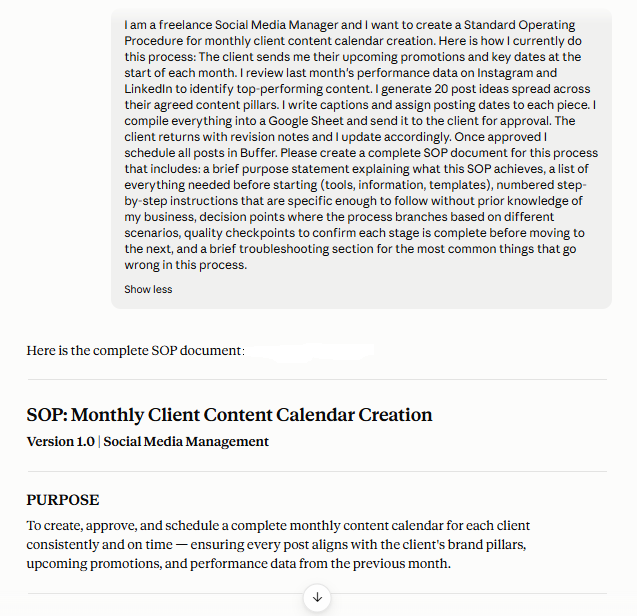
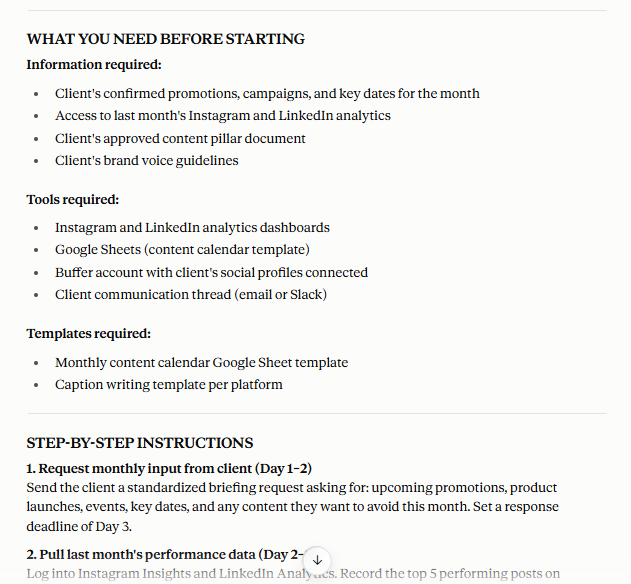
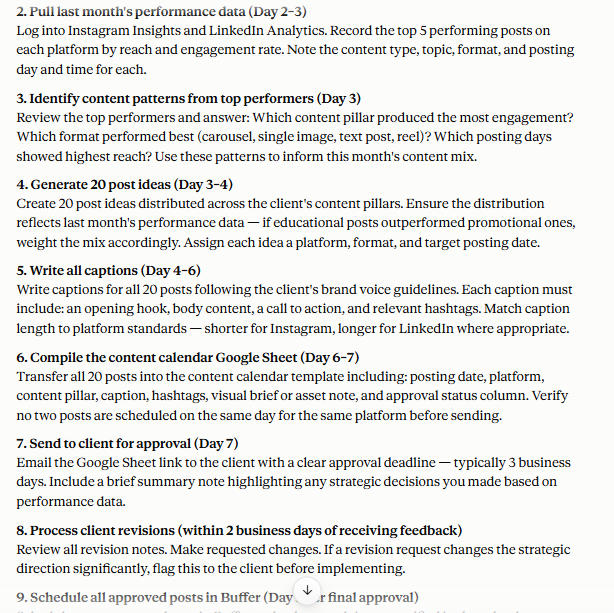
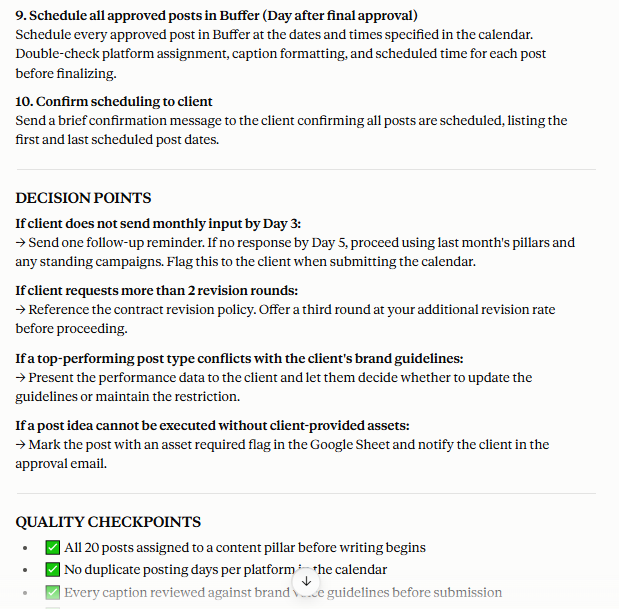
I am a freelance [your service type] and I want to create a Standard Operating Procedure for [specific process]. Here is how I currently do this process: [describe your current process in whatever detail you have — bullet points, rough notes, or a conversational description all work]. Please create a complete SOP document for this process that includes: a brief purpose statement explaining what this SOP achieves, a list of everything needed before starting (tools, information, templates), numbered step-by-step instructions that are specific enough to follow without prior knowledge of my business, decision points where the process branches based on different scenarios, quality checkpoints to confirm each stage is complete before moving to the next, and a brief troubleshooting section for the most common things that go wrong in this process.
Following are the screenshots of output of the above prompt with sample service type and sample specific process from Claude AI. One can easily give that prompt to Claude AI (or any other AI) according to their own service type and specific process and get the required output:
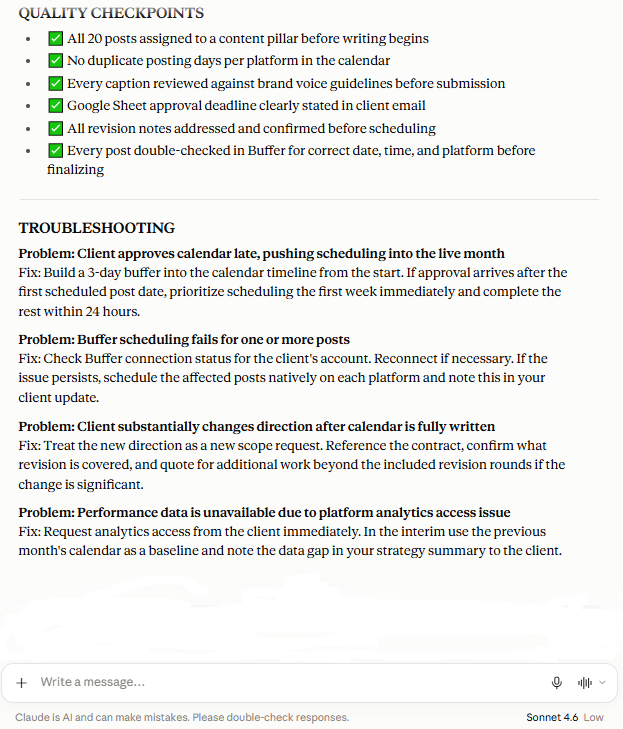
The description you provide does not need to be polished or complete — rough notes and conversational description give the AI enough to work with and the gaps it identifies in your description become the clarifying questions that improve the SOP. If you describe your client onboarding process in five rough bullet points the AI will produce a fifteen-step SOP and identify the three decision points your five bullet points implied but did not specify.
The refinement prompt that follows:
This SOP looks good. Please now: add a checklist version at the end that summarizes every action item in the SOP as a simple tick-box checklist I can use during execution, identify any steps where I could use an AI tool to make the process faster and add a note about which tool and how, and suggest two or three template documents that would make this SOP faster to execute if they existed.
The checklist output from this refinement prompt is what you actually use day-to-day — the SOP document is the reference and the checklist is the execution tool. Having both from one AI session is the complete output that makes the SOP immediately usable rather than requiring additional work to translate the document into an actionable format.
Step 3 — Organize Your SOP Library
A collection of SOP documents that is not organized for fast retrieval is a collection you will not use consistently — the library that felt like a great idea when you built it and that you stopped opening within two weeks because finding the right SOP took longer than just running the process from memory.
The organizational structure that produces the most consistently used SOP libraries for freelancers uses a simple three-level hierarchy:
Level 1 — Category folders matching the categories from your initial process list (Client Acquisition, Client Onboarding, Project Delivery, Client Communication, Business Administration, Offboarding)
Level 2 — Individual SOP documents within each category folder named with the specific process they cover (New Client Discovery Call SOP, Proposal Creation SOP, Project Delivery Checklist SOP)
Level 3 — Template documents linked from each SOP — the actual email templates, checklists, and scripts that the SOP references and that are stored alongside or linked within the SOP document
The tool that hosts your SOP library matters for how usable it is in practice. Notion is the most consistently recommended SOP library tool for freelancers because its linked database structure allows SOPs to reference templates, checklists, and other SOPs through clickable links rather than the folder-within-folder navigation that document storage alternatives require. Google Drive works adequately for simpler libraries. Whatever tool you choose, accessibility from any device and fast search are the two functional requirements that determine whether you actually open the library during the processes it covers.
Step 4 — The AI Audit That Makes Your SOPs Actually Complete
After creating your initial SOP documents run each one through an AI audit that identifies gaps and improvements that your description of the process and the AI’s initial generation together might have missed.
The SOP audit prompt:
Here is an SOP I created for [process name]: [paste the complete SOP]. Please audit this document and identify: any steps that are missing that a thorough version of this process should include, any steps that are ambiguous enough that two people following them might do different things, any decision points that the SOP does not address that would arise in real execution of this process, any tools or resources referenced that are not explained clearly enough for someone unfamiliar with my business setup to use, and any quality checkpoints that are missing between steps where errors could propagate to later stages undetected.
One can use this prompt to give to any AI (Claude or ChatGPT) in order to get the output as mentioned and described in the step no.2 above.
The gap analysis that this audit prompt produces consistently identifies two to four meaningful improvements per SOP that the initial creation missed — the missing step that experienced practitioners skip automatically because it is so habitual it no longer feels like a step, the decision point that always comes up but was not in the initial description, and the quality checkpoint that prevents the error that has actually happened to you before but that the SOP as written would not prevent from happening again.
Step 5 — Using Your SOP Library Daily
The client communication SOPs in your library are the most immediately valuable because they address the repeated decision-making that client interactions require multiple times per week across every active client relationship. For the specific AI workflow that handles one of the most important client communication situations check out our guide on how to use AI to turn client feedback into clear action items — the prompt framework that processes even the vaguest client feedback into specific executable tasks.
The daily habit that makes an SOP library genuinely valuable rather than an organizational project that produced a folder you never open is the open-before-you-start discipline — opening the relevant SOP before beginning any process it covers rather than after you are already mid-process and have already made the decisions the SOP was designed to make for you.
This sounds obvious but it is the habit that most SOP library builders fail to establish because it requires a moment of friction — opening a document before starting a familiar task feels unnecessary when you have done the task dozens of times before. The value only becomes apparent when you notice that following the SOP consistently produces better outcomes with less mental effort than running the same process from memory, which takes approximately three weeks of consistent practice to become self-evidencing.
Content creation is one of the freelance business activities that benefits most from SOP documentation — the process that feels creative and therefore undocumentable but that actually follows a repeatable structure that documentation makes consistently faster and consistently better. For the complete documented AI content workflow that is itself an example of what a well-built content creation SOP looks like in practice check out our guide on my proven AI content creation workflow for managing multiple websites effortlessly — the real-world system that a content SOP in your library can mirror.
The Quarterly SOP Review
Your business evolves — new tools replace old ones, client expectations shift, and the processes that worked six months ago may have better approaches available now. A quarterly fifteen-minute SOP review keeps your library current rather than the gradually outdated documentation that reflects how you worked eighteen months ago rather than how you work now.
The quarterly review prompt:
Here is my SOP for [process]: [paste SOP]. I created this approximately [time period] ago. Since then [describe any relevant changes — new tools, changed client expectations, lessons learned from specific situations]. Please update this SOP to reflect these changes and identify any other updates that would improve it based on current best practices for freelance [your service type] businesses.
Frequently Asked Questions
Q: How many SOPs does a freelance business actually need?
A: A genuinely useful starter library covers eight to twelve core processes — enough to document every high-frequency repeatable task without the scope that makes building the library feel like a project that requires weeks to complete. Most freelancers find that eight well-built SOPs covering client onboarding, proposal creation, project delivery, feedback handling, invoicing, late payment follow-up, testimonial requests, and monthly business review produce the most immediate time savings. Additional SOPs for less frequent processes can be added over time as the library-building habit is established.
Q: Will following SOPs make my work feel mechanical and less creative?
A: SOPs cover the administrative and procedural aspects of your business — the parts that are already not creative regardless of whether they are documented. The discovery call framework, the invoice sending process, the project folder setup — these are not creative activities that documentation inhibits. They are administrative activities that documentation makes faster so that more of your cognitive energy is available for the genuinely creative work that your service delivers. Most freelancers who build SOP libraries report feeling more creative after implementation, not less, because the cognitive overhead that administrative processes previously consumed is now handled by documented systems.
Q: What if my processes change frequently — will SOPs become outdated quickly?
A: This is the concern that prevents many freelancers from building SOPs and it is less problematic in practice than it sounds in theory. Core freelancing processes — client onboarding, project delivery, invoicing — change far less frequently than freelancers expect when they think about this concern. The quarterly review process in this guide handles the updates that do occur without making currency maintenance a significant ongoing time investment.
Q: Should I share my SOPs with subcontractors or virtual assistants?
A: Yes — and this is actually one of the most significant value multipliers of a well-built SOP library. The freelancer who can hand a subcontractor or VA a documented SOP and receive consistent quality output without extensive supervision has built the delegation infrastructure that allows genuine business scaling. The SOP that was built for your own consistency becomes the training document that makes delegation reliable — the infrastructure investment that pays back with every hour of work you successfully delegate.
Conclusion
The freelance business SOP library is not a bureaucratic project for freelancers who want to run their creative businesses like corporations. It is the practical documentation of the systems you already have — the processes you already follow, made explicit and organized so they serve you consistently rather than requiring your full attention every time you execute them.
AI makes building this library the afternoon project it should always have been rather than the weeks-long documentation effort that the upfront investment historically required. One focused afternoon using the prompt framework in this guide produces the starter library that immediately begins saving time on the processes you execute most frequently — the compound return on a one-time investment that grows with every week you use the systems you built.
Your business already has processes. AI helps you document them. Your SOP library makes them work for you instead of requiring you to work through them from scratch every single time.
Explore the complete collection of AI-powered freelancing resources at NextGen Freelancer — NextGen Freelancer Products Page — including the complete SOP library starter pack that makes every repeatable freelance process faster more consistent and genuinely documented.