

Let me describe a situation you have almost certainly experienced. A client sends you feedback on a deliverable you worked hard on. The feedback says something like — it is close but the tone feels a bit off, and can we make it pop a bit more? Maybe freshen it up? You stare at this for a few minutes trying to decode what pop more and freshen it up actually mean in terms of specific changes to a specific document.
You make some changes based on your best interpretation, send it back, and receive another round of feedback that suggests your interpretation was not quite right. A second revision round consumes time that was not budgeted, creates friction in the client relationship, and leaves you frustrated that the original feedback was not clearer.
This situation is not primarily a client problem. Clients communicate in the language of their subjective experience — they describe how the work feels rather than what specifically needs to change because they are not trained to give technical creative feedback and most of them are doing their best to communicate something they cannot always precisely articulate. Knowing how to use AI to turn client feedback into clear action items is the skill that bridges this gap — the process that takes the language of the client’s subjective experience and converts it into the specific technical changes that your deliverable requires.
Client feedback is the most information-dense and most frequently mismanaged communication that freelancers receive. According to the Project Management Institute‘s research on project communication failures, unclear or misinterpreted feedback and revision instructions are among the leading causes of project delays, scope disputes, and client relationship deterioration in professional service engagements — with the gap between what clients mean and what service providers understand them to mean being responsible for a significant proportion of revision cycles that could have been avoided with better feedback processing.
Why Client Feedback Is Hard to Act On Directly?
Before getting into the AI workflow, understanding why client feedback is structurally difficult to act on directly helps explain why an interpretation process is necessary rather than optional.
Clients describe outcomes rather than inputs. When a client says the copy does not feel energetic enough, they are describing the reading experience they want — the outcome. They are not specifying the inputs that produce that outcome: shorter sentences, stronger verbs, more second-person direct address, fewer passive constructions, more specific examples rather than general statements.
The freelancer who hears lacks energy and knows which of these inputs to adjust has experience converting outcome language into technical input changes. The AI prompt that receives the same feedback can perform this conversion explicitly and comprehensively.
Clients mix problems with solutions unhelpfully. Client feedback frequently contains both the problem they have identified and their proposed solution — and their proposed solution is not always the best one for the underlying problem. The client who says can you make the logo bigger might actually be experiencing a contrast problem where the logo does not stand out from the background — and making it bigger might solve the problem but so might adjusting the color contrast.
AI analysis of the feedback can identify the underlying problem that the client’s proposed solution is attempting to address and provide a range of solution options that the client’s specific proposal may or may not represent optimally.
Feedback arrives in mixed formats. Email threads, voice notes transcribed imperfectly, PDF annotations, in-call verbal notes hastily recorded, and Slack messages across multiple threads — the feedback that relates to one project often arrives through multiple channels in a format that requires assembly before it can be acted on. AI can receive this mixed-format input and produce organized structured output regardless of how scattered the incoming information is.
The Core AI Feedback Processing Workflow on How to Use AI to turn client feedback into clear action items.
The workflow that consistently converts even the vaguest client feedback into specific actionable tasks follows a four-step process that takes ten to fifteen minutes per feedback package and produces the clarity that reduces revision rounds from the average of two to three for most freelancers to consistently one. Here are some steps on how to use AI to turn client feedback into clear action items.
Step 1 — Consolidate all feedback into one document
Before any AI processing, gather every piece of feedback from every channel into a single document. Copy the email text, paste the Slack messages, transcribe the voice note or meeting recording, type out the verbal feedback from the call notes. This consolidation step takes five minutes and makes every subsequent step more efficient by eliminating the context-switching between channels that processing scattered feedback requires.
Step 2 — Submit to AI with the original brief alongside
This is the step that most feedback processing approaches miss — providing AI with both the client feedback and the original project brief simultaneously. The AI that can see what was asked for alongside what the client’s response to it was can identify the specific gaps between expectation and delivery that the feedback reflects, rather than interpreting the feedback in isolation from the context that produced it.
The prompt that makes this step most effective:
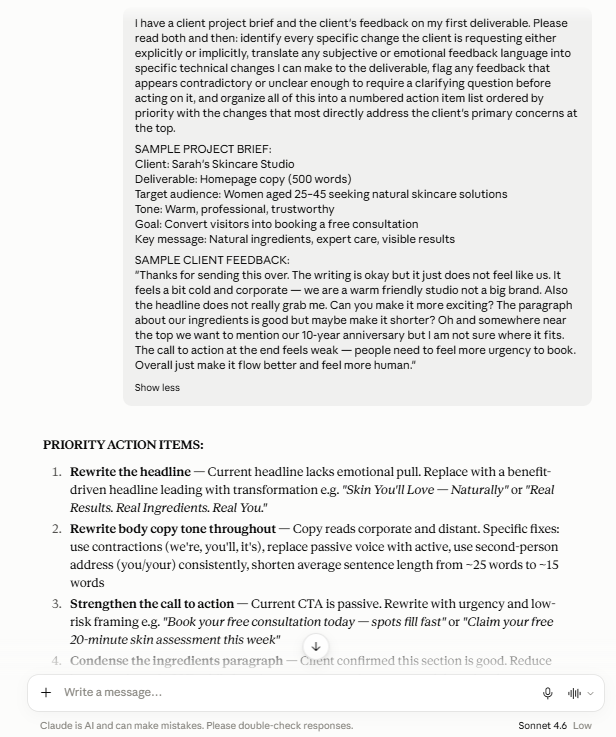
I have a client project brief and the client’s feedback on my first deliverable. Please read both and then: identify every specific change the client is requesting either explicitly or implicitly, translate any subjective or emotional feedback language into specific technical changes I can make to the deliverable, flag any feedback that appears contradictory or unclear enough to require a clarifying question before acting on it, and organize all of this into a numbered action item list ordered by priority with the changes that most directly address the client’s primary concerns at the top.
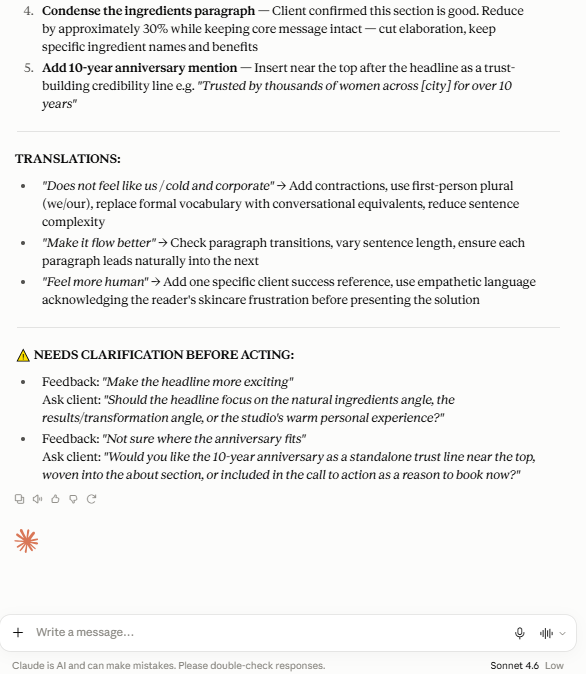
Note: See the output of above prompt in the following image. The project brief and client feedback below are sample examples created to demonstrate how this prompt works in practice. Replace them with your own real brief and actual client feedback when using this in your workflow.
Step 3 — Identify the action items versus the clarification items
The AI output from Step 2 will contain two categories: feedback that can be converted into clear action items and feedback that requires a clarifying question before it can be reliably acted on. Separating these two categories is essential — acting on unclear feedback without clarification produces the wrong revision that generates another round rather than the right revision that closes the feedback loop.
The action items go directly onto your revision task list. The clarification items go into a concise follow-up message to the client that asks the minimum number of specific questions needed to resolve the ambiguity — not a message that asks the client to explain their feedback entirely, but a message that asks the single specific question that unlocks each unclear item.
Step 4 — Confirm your understanding before revising
Before beginning revision work, send the client a brief summary of your understood action items for their confirmation. This is not a defensive move — it is a professional practice that most clients appreciate because it demonstrates that you heard their feedback, processed it thoroughly, and plan to address it specifically rather than making random changes and hoping the result lands closer to what they wanted.
Prompt Templates for Specific Feedback Situations
Different types of difficult feedback require different AI prompt approaches. Here are the specific situations and the prompts that address each most effectively.
For vague subjective feedback:
My client said: [paste exact client feedback]. The deliverable this refers to is a [type of deliverable] for a [type of business] targeting [target audience]. Please translate this subjective feedback into specific technical changes I can make to the deliverable. For each piece of vague language — words like fresh, pop, energetic, professional, modern — provide three to five specific technical interpretations of what that language might mean in the context of this deliverable type, so I can identify which interpretation most likely matches what the client is experiencing.
For contradictory feedback:
My client has provided feedback that appears to contain contradictions: [paste the contradictory feedback]. Please identify specifically where the contradictions exist, explain what the client might actually be trying to achieve with each conflicting instruction, and suggest either a resolution that satisfies both instructions simultaneously or the clarifying question I should ask the client to determine which instruction takes priority.
For emotionally charged negative feedback:
My client has provided the following feedback in a frustrated or disappointed tone: [paste feedback]. Please set aside the emotional tone and identify only the specific content concerns embedded in this feedback — what they are actually saying needs to change technically, separate from how they feel about the current version. Then help me draft a professional response that acknowledges their experience, confirms my understanding of what needs to change, and maintains the collaborative working relationship.
For overwhelmingly detailed feedback:
My client has provided very detailed feedback across multiple areas: [paste feedback]. Please organize this feedback into: critical changes that the client has indicated are most important, secondary changes that address their concerns but are not marked as critical, changes that appear optional or stylistic, and any items that require clarification before I can act on them. Present these as a prioritized task list.
Using AI to Draft the Revision Confirmation Message
Once your action item list is clear the revision confirmation message — the professional note to the client that summarizes what you understood and plan to address — is the next highest-value AI application in the feedback workflow.
The prompt that produces the best revision confirmation message:
Based on the following client feedback and the action items I have identified from it, please draft a brief professional message to the client that: thanks them for their feedback, confirms my understanding of the specific changes they want by summarizing the action items in plain language, notes any items I will need clarification on with the specific question for each, and gives them a realistic timeline for the revised deliverable. Keep the tone warm and professional, approximately 150 words, and frame the message as a collaborative confirmation rather than a defensive justification.
Note: See the output of above prompt in the following image. The project brief and client feedback below are sample examples created to demonstrate how this prompt works in practice. Replace them with your own real brief and actual client feedback when using this in your workflow.
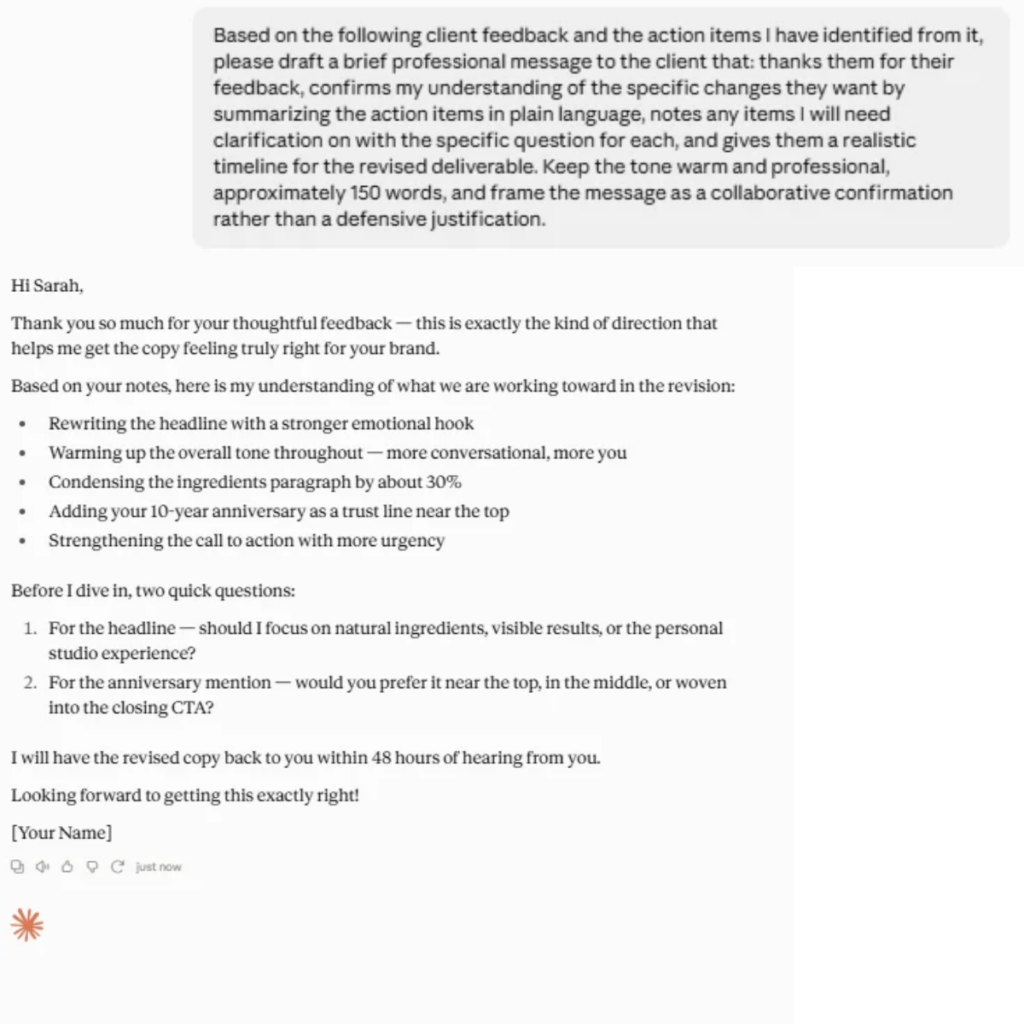
The revision confirmation message serves three purposes simultaneously. It protects you by creating a written record of what was agreed before revision work begins. It reassures the client that their feedback was genuinely heard and understood. And it surfaces any misunderstandings before you invest revision time in the wrong direction — the client who reads your summary and realizes you interpreted their feedback differently than intended can correct this before you spend three hours executing the wrong revision.
Building a Feedback Pattern Library
The feedback patterns that accumulate across multiple client projects reveal the most important strategic information available about your service delivery — the recurring themes that indicate either a communication gap in your briefing process or a genuine quality gap in specific aspects of your deliverables.
For the complete system that uses AI to analyze these patterns alongside your broader business performance check out our guide on how to use AI to analyze your freelance business — the quarterly review process that turns accumulated feedback data into a specific improvement roadmap.
After each project is complete, spend five minutes with AI reviewing the feedback it generated:
Here is the feedback I received across [number] revision rounds on this project: [paste all feedback]. What patterns do you notice in this feedback — are there recurring themes, specific aspects of my deliverable that consistently needed adjustment, or communication gaps in the original brief that the revision feedback suggests? What would you recommend I address in my briefing process or deliverable approach to reduce the likelihood of similar feedback on future projects?
The patterns that emerge from this per-project review, accumulated across a quarter of projects, create the most specific and most evidence-based improvement roadmap available for your service quality — the difference between generic professional development and targeted improvement of the exact aspects of your work that the actual client response to it identifies as inconsistent.
The Revision Clause Protection
The revision clause in your contract is the structural protection that defines how many revision rounds are included and what constitutes a revision versus a new direction — but even the best contract cannot make vague feedback specific without an active interpretation process. For the complete contract clause that protects your revision boundaries before feedback arrives check out our guide on how to write a freelance contract — every essential clause including the revision policy that prevents unlimited change requests from eroding your project profitability.
The AI feedback processing workflow complements your contract revision clause rather than replacing it. The contract defines the boundary. The AI workflow helps you work efficiently within it — processing each round of feedback completely and clearly so that each revision round closes the feedback loop rather than generating another one through misinterpretation.
When a client provides feedback that falls outside the agreed revision scope — new direction rather than revision of existing work — the AI-organized action item list makes this boundary clearly visible. You can show the client the organized list, note which items fall within the revision scope and which represent new scope, and have the scope conversation from a position of documented clarity rather than the defensive improvisation that unorganized feedback makes necessary.
Frequently Asked Questions
Q: What if the client’s feedback is so vague that even AI cannot interpret it?
A: This is the signal that a clarifying call rather than a written clarification question is the right next step. Some feedback is sufficiently subjective that no amount of written exchange resolves the ambiguity — the client who says it just does not feel right is often describing a visceral response to the work that they cannot articulate in writing but that a ten-minute call where you ask specific questions and they respond in real-time resolves efficiently.
Use AI to prepare for that call — generate a list of specific questions that cover the most likely interpretations of their vague feedback — so the call is focused and efficient rather than a broad exploratory conversation.
Q: Should I tell clients that I am using AI to process their feedback?
A: The AI is processing the information the client provided to you — the same activity that your own brain performs when you read and interpret feedback, just with AI assistance in making the interpretation explicit and comprehensive. There is no ethical obligation to disclose this internal processing step any more than you would disclose using a spellchecker or a grammar tool. What matters is the quality of your revision response to the feedback, which AI-assisted processing improves rather than compromises.
Q: How do I handle feedback that is personally critical rather than technically specific?
A: Separate the personal from the technical immediately and process only the technical content through the AI workflow. Client feedback that crosses into personal criticism rather than work criticism is a relationship and professional boundary issue that the AI feedback processing workflow is not designed to address — that situation warrants the direct professional conversation covered in the dealing with difficult clients guide.
For feedback that is emotionally negative but technically substantive, the emotionally charged feedback prompt above separates the emotional tone from the actionable technical content effectively.
Q: Can this workflow help with feedback that arrives during a call rather than in writing?
A: Yes — record the call with the client’s permission, use a transcription tool to convert the recording to text, and then process the transcribed feedback through the same AI workflow. Many video conferencing platforms including Zoom and Teams include built-in transcription. The transcribed call feedback often contains even more valuable information than written feedback because clients speak more freely in conversation than in writing — the offhand comment during a call often reveals the underlying concern more clearly than the carefully worded written feedback that followed it.
Conclusion
The gap between what clients mean and what freelancers understand them to mean is where revision cycles multiply, client relationships strain, and project profitability erodes. AI does not close this gap by reading minds — it closes it by making the interpretation process that experienced freelancers perform intuitively into an explicit, comprehensive, and documented step that any freelancer can apply consistently regardless of how much experience they have with a specific client, project type, or feedback style.
The ten to fifteen minutes you invest in processing each feedback package through this workflow pays back in reduced revision rounds, clearer client communication, and the professional confidence that comes from knowing exactly what you are changing and why — rather than the anxious guesswork that unprocessed vague feedback consistently produces.
Explore the complete collection of AI-powered freelancing resources at NextGen Freelancer — NextGen Freelancer Products Page — including the complete client feedback processing system that makes every revision round faster clearer and more professionally managed.