
Publishing a blog post used to feel like the end of the content creation process to me. I would research a topic, write the article, optimize it for SEO, add images, publish it, and then move on to the next one.
The problem with that approach is obvious once you start running more than one website: a lot of work goes into creating a useful article, yet the finished content gets only one chance to reach people.
That changed when I started treating every published article as source material for several smaller pieces of content.
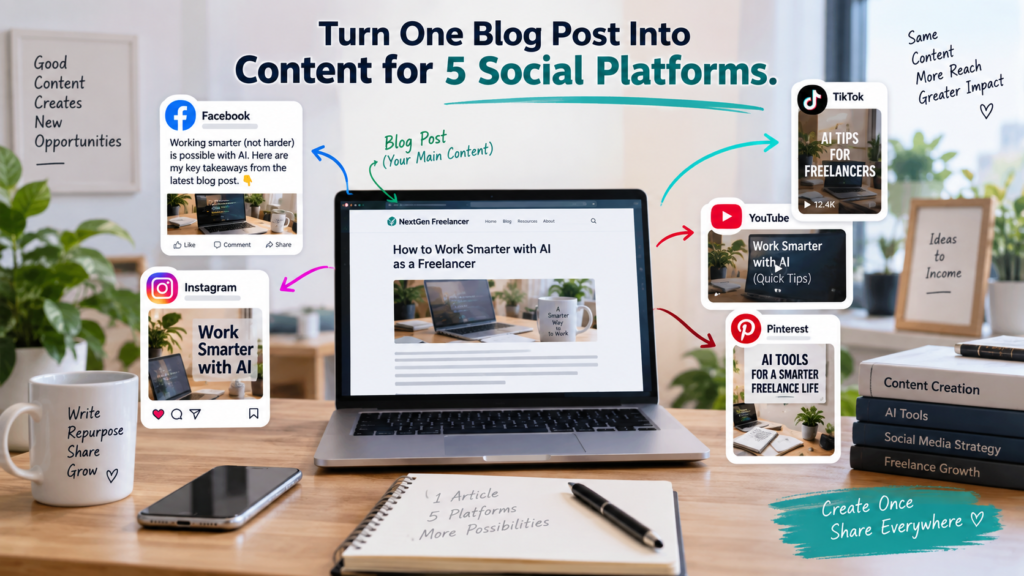
Today, when I publish a blog post, I can turn the same core information into content for Facebook, Instagram, TikTok, YouTube, and Pinterest. AI helps me do much of the repetitive work, while I still decide what to say, how to present it, what visuals to use, and whether the final content actually represents the original article accurately.
This approach has become particularly useful while managing multiple websites. Creating completely separate content from scratch for every social platform would take far more time than I realistically want to spend on social media.
Instead, I repurpose blog content with AI and adapt it to the way people consume content on each platform.
There is an important distinction here, though.
I don’t simply ask AI to copy my article five times and shorten it.
Facebook isn’t Instagram. Pinterest isn’t TikTok. A YouTube Short isn’t simply an Instagram caption with a video attached.
The original idea stays the same, but the presentation changes.
In this article, I’ll show you the workflow I use to turn one blog post into content for five social platforms, where AI saves me time, where I still prefer manual input, and what I’ve learned from doing it repeatedly.
Why I Started Repurposing Blog Content With AI
The main reason was simple: efficiency.
Writing a good blog article takes time. Even when AI assists with research, outlining, drafting, or editing, I still have to choose the topic, evaluate the content, optimize the article, prepare images, add links, format everything in WordPress, and make sure the finished post is worth publishing. I use an AI content creation workflow to make researching, drafting, optimizing, and publishing blog content more efficient.
Once all that work is complete, it seems wasteful to use the information only once.
Suppose I publish an article about a particular product category or a freelancing problem. That article may contain several useful ideas, recommendations, comparisons, questions, examples, and takeaways.
Any one of those can potentially become a social post.
The blog remains the main piece of content. Social media then becomes a way of presenting small parts of that information in formats designed for different audiences.
AI makes this much easier.
Instead of sitting in front of five blank social-media composition boxes wondering what to write, I can provide the original article or its key information to an AI assistant and ask it to help transform the material.
That is what I mean when I talk about using AI for content repurposing.
The AI isn’t replacing the original content. It is helping me extract more value from content I’ve already created.
My Basic Content Repurposing Workflow
My workflow begins only after the blog article is finished.
I prefer this because I want the published article to be the main source. If I simultaneously create the article, Facebook post, Pinterest text, video script, and Instagram caption before the article itself is finalized, it’s much easier for the different versions to drift away from each other.
So my process looks roughly like this:
Blog article → identify the strongest angle → generate platform-specific content → create visual/video → review manually → publish
AI is mainly involved in the middle.
I give it the topic and relevant information and ask for social content appropriate for each platform. I then review the output rather than automatically publishing whatever it generates.
This review is important.
AI sometimes makes captions too generic. Sometimes it produces too many hashtags. Sometimes it adds a claim I wouldn’t personally make. And sometimes a perfectly good Facebook caption simply doesn’t work as a TikTok description.
The ability to generate content quickly is useful.
The ability to recognize what shouldn’t be published is just as useful.
Step 1: Start With the Published Blog Post
Before I repurpose blog content with AI, I want the original article to be complete.
That means the article has already gone through my normal publishing process: content review, SEO optimization, headings, internal and external links where appropriate, images, ALT text, and final formatting.
I then look at the article from a social-media perspective.
I’m not asking, “How can I summarize these 2,000 words?”
I’m asking:
What is the most interesting reason someone would want to know about this topic?
That’s a much better starting point.
For example, imagine an article about affordable kitchen equipment. The social-media angle doesn’t necessarily need to be:
“We published a new article about kitchen equipment.”
That gives someone very little reason to stop scrolling.
A better angle might be a problem:
“You don’t need expensive equipment to make everyday kitchen tasks easier.”
Or a question:
“Which inexpensive kitchen upgrades are actually worth buying?”
Or a useful takeaway from the article.
The blog post contains the complete answer. Social media creates the curiosity that gets someone interested in that answer.
This distinction has made my social content much easier to plan.
Step 2: Give AI Enough Context
One mistake I try to avoid is giving an AI tool nothing more than an article title and expecting excellent social content.
For example:
“Write an Instagram post about the best kitchen gadgets.”
AI can certainly produce something.
But it doesn’t know my article. It doesn’t know what products or points I covered. It doesn’t know my preferred angle. It may simply generate generic information based on the topic.
Instead, I give the AI enough context to work with.
Depending on the task, that can include the article title, the main points, the intended audience, the website address, the type of post I want, and any important formatting requirements.
When I repurpose blog content with AI, I also tell it which platform I’m preparing the content for.
That last part matters more than it might seem.
I don’t want “social media copy.”
I want Facebook copy, or Pinterest copy, or TikTok copy.
The difference produces much more usable results.
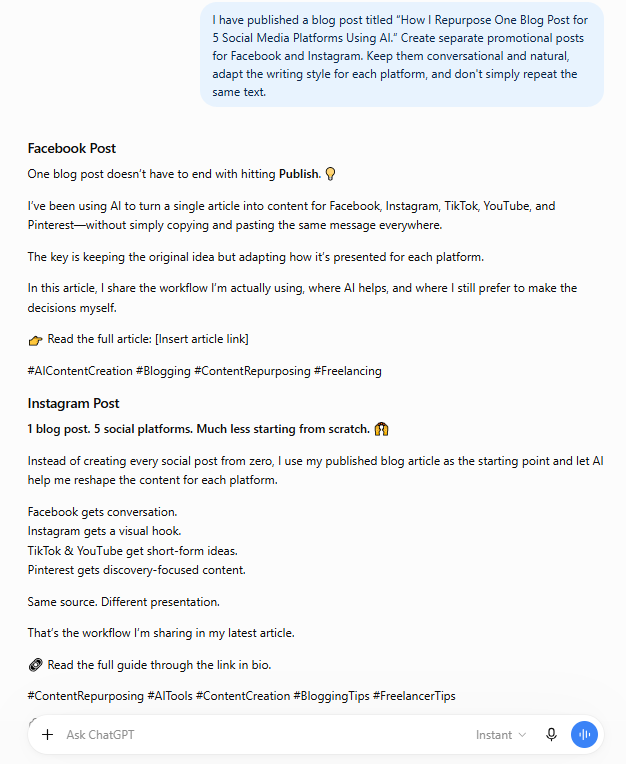
Step 3: Repurpose Blog Content With AI for Facebook
Facebook gives me more room to explain an idea than some of the more visually driven platforms.
For a Facebook post, I generally want a strong opening, a short explanation of the problem or benefit, a reason to read the article, and a clear call to action.
I don’t want to paste several paragraphs from the blog.
The Facebook post should stand on its own while still giving readers a reason to visit the full article.
A simple AI instruction might be:
Create a Facebook post based on this article. Start with an engaging hook, briefly explain why the topic matters, highlight the main benefit, and encourage readers to visit the full article. Keep the tone conversational rather than overly promotional.
The important part comes after AI produces the draft.
I read it.
Would I actually say this?
Does it promise something the article doesn’t deliver?
Does it sound like an advertisement rather than useful content?
Is the opening interesting?
If necessary, I change it.
That’s one reason I don’t view AI content repurposing as a one-click automation. AI removes a large amount of drafting work, but the final judgment still belongs to me. Meta also provides its own resources for creators through Meta for Creators.
Step 4: Adapt the Same Article for Instagram
Instagram requires a slightly different mindset.
The visual usually does more of the initial work, so I don’t expect the caption to carry the entire post.
I prefer a shorter, easier-to-scan caption built around the main benefit or problem.
If the original article contains several recommendations, the image or short video can introduce the topic while the caption gives enough context to make the viewer interested.
When I ask AI for the Instagram version, I specifically tell it not to simply reproduce the Facebook post.
That instruction sounds obvious, but it helps.
For example:
Turn this article into an Instagram caption. Use a short attention-grabbing opening, conversational language, a brief takeaway, a call to read the full article, and only relevant hashtags.
Again, I treat the output as a draft.
I often remove unnecessary emojis, repetitive wording, exaggerated claims, or hashtags that don’t really fit the topic.
AI is very good at producing more.
My job is often deciding what should be removed.
Step 5: Turn the Article Into TikTok Content
TikTok changes the workflow because now I’m thinking primarily about video.
A long article may contain enough material for several short videos, but I usually begin with one clear angle.
Trying to compress the entire article into a few seconds produces rushed content.
Instead, I ask:
What single idea from this article can be understood quickly?
That might be one problem, one recommendation, one surprising observation, or a quick selection of items from a larger list.
AI can help me convert that idea into a short hook, voiceover, caption, or video concept.
For the websites I’m working on, I’ve also been experimenting with a simple short-video workflow: create a vertical source visual, animate it into a short clip using an AI video tool, and then finish the video in Canva with elements such as voiceover, captions, or a branded ending.
This has taught me something important about AI video creation:
More complicated prompts don’t always produce better results.
I initially assumed detailed instructions would give an AI video generator more control. In practice, I’ve often found that concise prompts containing only the essential action and constraints are easier to work with.
That experience has influenced how I use AI elsewhere as well.
Give the tool enough direction to understand the task—but don’t automatically assume that a huge prompt is a better prompt.
Step 6: Repurpose the Blog Post for YouTube
For my current workflow, YouTube content connected to a blog article is usually suited to short-form video rather than turning every article into a long YouTube presentation.
That makes YouTube Shorts and TikTok somewhat related from a production perspective, but I still prepare the publishing copy for each platform separately.
The title matters more on YouTube than simply reusing a generic social caption.
I want the title to make the subject immediately understandable.
The description can then briefly explain what the viewer is seeing and point toward the full article for additional information.
When I repurpose blog content with AI for YouTube, I may ask for several possible titles rather than accepting the first one.
This is one of the easiest ways AI helps without taking over the creative decision.
Generating ten possible titles takes seconds.
Choosing the one that best represents the content is still my decision.
Step 7: Pinterest Requires Its Own Treatment
Pinterest is particularly interesting because it sits somewhere between social media, visual discovery, and search. I’ve explored this in more detail in my guide on how Pinterest can drive traffic to your website.
That means I don’t treat a Pinterest pin like an Instagram image.
The pin itself needs to communicate the topic quickly, and the wording should connect closely with what someone interested in that subject might be looking for.
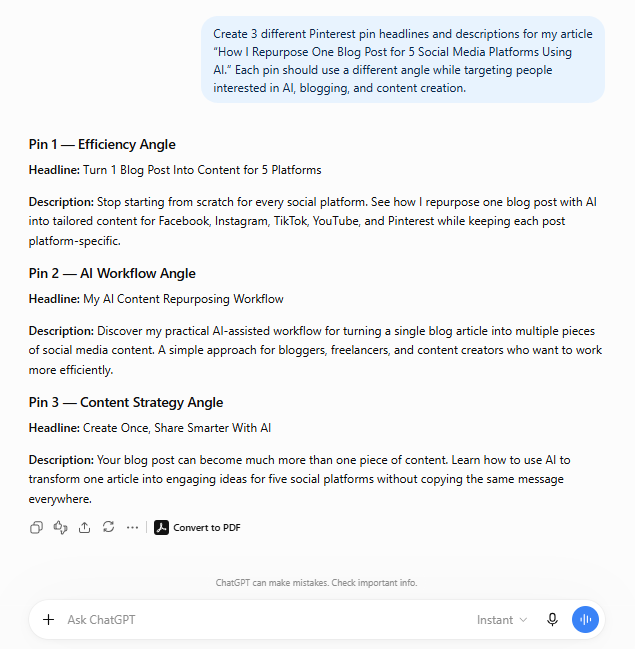
For a single article, I prefer creating multiple pin designs rather than relying on one image forever.
The designs can vary in headline, image, layout, background, and angle while still pointing to the same article.
For example, one article might produce pins based on:
- the primary article title,
- a problem-solving angle,
- a benefit-focused headline,
- a question,
- or a specific recommendation contained within the article.
This is one of the areas where repurposing becomes especially powerful.
One article doesn’t have to equal one pin.
The article is the content asset. The pins are different doors leading to it.
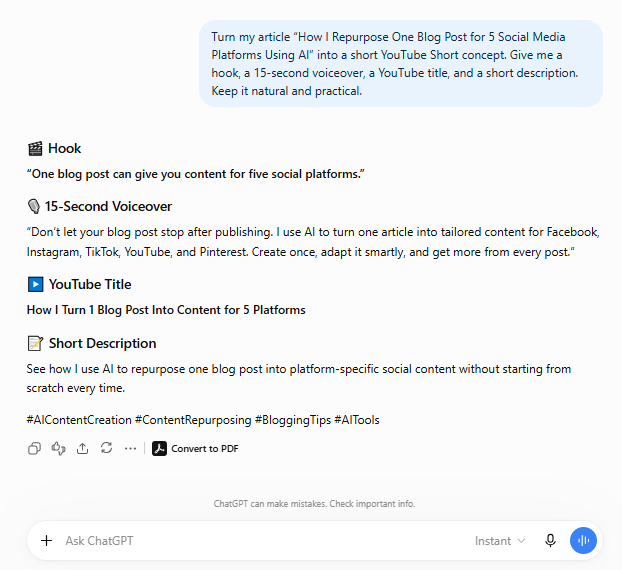
When I use AI to help with Pinterest content, I want it to generate concise titles and descriptions rather than simply shortening the introduction of my blog article.
I then pair those with visuals designed specifically for Pinterest. Pinterest also publishes guidance and creative resources for businesses through Pinterest Business.
The Biggest Mistake: Posting the Same Content Everywhere
If there is one lesson I would emphasize, it is this:
Content repurposing is not content duplication.
It is tempting to create one caption and paste it into Facebook, Instagram, TikTok, YouTube, and Pinterest.
That certainly saves time.
But it also ignores why people use those platforms differently.
When I repurpose blog content with AI, I want the idea to remain consistent while the presentation changes.
For example:
Blog: full explanation
Facebook: conversation and context
Instagram: visual hook + concise caption
TikTok: fast video idea
YouTube: searchable/watchable short-form presentation
Pinterest: visual discovery leading back to the article
It’s still one content ecosystem.
It just isn’t five copies of the same post.
How Much Time Does AI Actually Save Me?
I don’t use a stopwatch for every part of this process, so I don’t want to invent a dramatic percentage such as “AI saves me 73% of my content creation time.”
What I can say from experience is that it removes a lot of the blank-page work.
That is where I notice the difference most.
Without AI, I might finish an article and then have to independently think:
What should I say on Facebook?
What should the Instagram caption be?
What should the Pinterest description say?
What’s the YouTube title?
What’s the TikTok hook?
With AI, I can begin with several reasonable drafts almost immediately.
That allows me to spend more of my time selecting, correcting, refining, designing, and publishing instead of repeatedly starting from zero.
For someone managing several websites or content channels, that difference matters.
What I Still Do Manually
I think this part is important because discussions about AI workflows sometimes make the process sound almost completely automated.
Mine isn’t.
There are several things I don’t want to hand over blindly to AI.
I choose the article topics. I decide whether the content is worth publishing. I review claims. I decide which social angle makes sense. I select or create visuals. I check the final captions. I add the correct links. I decide whether a generated image or video actually looks right.
Most importantly, I decide whether the finished content represents the website properly.
AI can produce something grammatically perfect that I still don’t want to publish.
That distinction becomes clearer the more I use these tools.
Generation and judgment are two different jobs.
AI is extremely useful for the first.
I still want responsibility for the second.
What I’ve Learned From Repurposing Content Across Multiple Websites
Managing content for more than one website has made me much more aware of unnecessary repetition in my workflow.
If I have already spent time researching and publishing a useful article, I don’t want to start from zero every time I move to another platform.
At the same time, excessive automation creates its own problem: everything begins to sound the same.
That’s the balance I’m trying to maintain.
Use AI for repetitive transformation.
Keep human control over the message.
For me, the most useful lessons have been:
Start with good source content. AI cannot meaningfully repurpose an article that doesn’t contain much useful information in the first place.
Give AI context. A title alone usually produces generic results.
Ask for platform-specific content. Don’t ask for one universal social-media post.
Keep prompts clear. More instructions are useful only when they genuinely help define the task.
Review everything. AI output is a draft, not an automatic publishing decision.
Use different visual angles. Especially on platforms such as Pinterest, one article can support several creative approaches.
Don’t manufacture personal experience. If I haven’t tested something, I shouldn’t write as though I have.
That last point has become increasingly important to me.
AI makes it incredibly easy to write confidently about almost anything. That makes it even more important to distinguish between what a tool can explain and what I have actually experienced myself.
A Simple Prompt for Repurposing Your Own Blog Content
If you want to repurpose blog content with AI, you don’t need an enormous prompt.
A practical starting point is:
I’m going to provide a blog article. Use the article as the source and create separate content for Facebook, Instagram, TikTok, YouTube, and Pinterest. Adapt the hook, length, style, call to action, and format for each platform rather than repeating the same copy. Do not introduce facts or claims that aren’t supported by the original article.
You can then refine each platform individually.
For example, if the Facebook version is too long, tell the AI to shorten it.
If the Pinterest title is weak, ask for five alternatives.
If the TikTok concept tries to cover too much, tell it to focus on one idea.
I find this iterative approach more useful than trying to write a gigantic prompt that anticipates every possible requirement before seeing the first result.
How to Repurpose Blog Content With AI Without Sounding Like AI
This is probably one of the most important parts of the process.
AI has certain patterns it tends to fall into: overly polished introductions, excessive enthusiasm, predictable phrases, unnecessary conclusions, and sometimes an almost advertisement-like tone.
If every social post goes directly from AI to publication, those patterns can become obvious.
My solution isn’t complicated.
I edit.
Sometimes that means changing a sentence.
Sometimes it means deleting half the caption.
Sometimes I keep the idea but rewrite the opening myself.
And sometimes the AI produces something perfectly usable and I barely change it.
The objective isn’t to prove that no AI was involved.
The objective is to publish something useful, accurate, appropriate for the platform, and consistent with the way I want the website or brand to communicate.
AI is part of my workflow.
It isn’t the identity of the content.
Can One Blog Post Really Produce That Much Content?
Yes, provided the original article has enough substance.
A single detailed article can potentially produce a Facebook post, Instagram post, TikTok video, YouTube Short, several Pinterest pins, and additional posts built around individual ideas from the article.
But I wouldn’t force every article into every possible format.
Some topics are naturally visual.
Some work better as educational text.
Some make excellent short videos.
Others are much stronger as search-focused blog posts.
Content repurposing works best when you ask:
Where else would this particular idea be useful?
—not—
How many pieces of content can I squeeze out of this article?
That small change in thinking helps prevent repurposing from becoming content spam.
Is AI Content Repurposing Worth It for Freelancers?
I think it can be, particularly for freelancers who are already creating long-form content.
A freelance writer can turn an educational article into LinkedIn or Facebook content.
A designer can turn a case study into visual social posts.
A consultant can extract short lessons from a detailed guide.
A developer can turn a technical tutorial into a series of smaller educational posts.
And someone building an online business can use a single article as the foundation for several different ways of reaching potential readers.
The key is having something worthwhile to repurpose in the first place.
AI doesn’t solve the problem of having nothing useful to say.
It solves part of the problem of having something useful to say and needing to express it repeatedly in different formats.
That’s a much better use of the technology.
Frequently Asked Questions
1. Can I repurpose blog content with AI even if I use a free AI tool?
Yes. The basic workflow doesn’t depend on one particular AI platform. You need a tool capable of understanding your source material and generating or rewriting content based on your instructions. Features and usage limits vary between services, so choose the tool that fits your workflow and budget.
2. Should I paste my entire blog article into an AI chatbot?
You can provide the relevant source material if the tool’s input limits and your privacy requirements allow it. For very long articles, providing the title, important sections, key points, and intended audience may be sufficient. Avoid submitting confidential client information or material you don’t have permission to share.
3. Should I use exactly the same post on every social platform?
I don’t recommend it. The central message can remain consistent, but the presentation should suit the platform. A Pinterest pin, TikTok video, Instagram caption, and Facebook post serve different viewing behaviors.
4. How many social posts can I create from one article?
There isn’t a fixed number. A detailed article may contain several independent ideas worth repurposing, while a shorter article may only justify one or two social posts. I prefer letting the substance of the article determine the amount rather than aiming for an arbitrary number.
5. Does AI completely automate social media marketing?
Not in my workflow. AI helps with drafting, adapting, generating alternatives, and reducing repetitive work. I still review the content, make creative decisions, prepare or approve visuals, verify links, and decide what gets published.
6. Can I use AI-generated captions without editing them?
You can sometimes receive a good first draft, but I recommend reading everything before publication. Check facts, tone, relevance, claims, links, hashtags, and whether the content genuinely reflects the original article.
Final Thoughts
Learning how to repurpose blog content with AI has changed the way I think about publishing.
A blog post is no longer something I publish once and immediately leave behind.
It becomes a source.
The research can become a Facebook discussion. A useful takeaway can become an Instagram post. One idea can become a TikTok or YouTube Short. A recommendation can become a Pinterest pin. And several of those pieces can send interested readers back to the original article where the complete information lives.
The biggest benefit for me isn’t producing as much content as possible.
It’s getting more use from work I’ve already done.
At the same time, I’ve learned not to automate the process so aggressively that every platform receives the same generic material. AI works best in this workflow when it handles repetitive transformation while I remain responsible for context, judgment, visuals, accuracy, and the final message.
If you’re already publishing useful blog content, you probably don’t need to constantly invent completely new ideas for every social platform.
Start with what you’ve already created.
Choose one strong article. Identify its best ideas. Give those ideas the format they need for each platform. Use AI to speed up the repetitive parts, and keep enough human involvement that the final content still feels like it belongs to you.
That’s the approach I’m using now—and it’s a much more manageable way to turn one piece of long-form content into an entire content ecosystem.