

I want to be honest with you about something before we get into the workflow. For about eight months after I started taking social media seriously for my freelancing business, I was doing it the way most people do it — sitting down each morning, staring at a blank post draft, scrolling through what other people in my space were posting, and producing something that felt reactive and mediocre even when the final output was technically fine.
It was not just the time that it consumed, though that was significant. It was the mental load — the part of my brain that sat in the background every single day thinking about what to post tomorrow, interrupted creative work with sudden post ideas, and generally treated content creation as an open loop that never fully closed.
The workflow in this guide closed that loop. Learning how to create a month of social media content with AI in one day is the single most impactful productivity shift I have made in my freelancing business — and this guide walks you through every step of the exact system I use.
I now create everything for a full month in a single focused day — thirty-plus posts across multiple platforms, scheduled, formatted, and ready to publish — and then I simply do not think about social media content for the rest of the month. If that sounds like something worth three hours of your time to read and implement, let’s get into it.
Why You Need to Know How to Create a Month of Social Media Content With AI in One Day?
The daily content creation grind is one of the most well-documented productivity killers in the creator and freelancer economy. According to Hootsuite’s annual social media trends report, content creators and social media managers who batch their content creation into dedicated weekly or monthly sessions report significantly higher content consistency and lower creative burnout than those who create content daily in reactive sessions — with batching practitioners maintaining more consistent posting schedules despite spending less total time on content creation overall.
The reason daily content creation is so disproportionately expensive in time and mental energy is not the writing itself — it is everything that happens before the writing. The daily decision about what to post today. The contextual research to confirm the idea is current and relevant. The format selection — should this be a carousel, a single image post, a text post, a reel? The creative warmup from whatever you were doing before to the content creation mindset. Each of these micro-tasks takes five to fifteen minutes individually and collectively turns a twenty-minute writing task into a ninety-minute production.
The AI content creation workflow that makes a full month in one day possible is not about cutting corners on quality — it is about eliminating the decision fatigue and startup friction that makes daily content creation so disproportionately time-consuming relative to the actual writing time it involves. For the complete AI content workflow I use across my own multiple websites and content channels check out my guide on my proven AI content creation workflow for managing multiple websites effortlessly — the broader system that this social media workflow fits inside.
Batching addresses this through a different architecture — front-loading all the decisions, research, and creative setup into one session where the cognitive context is already loaded, and then running the writing production while that context is active and efficient. The result is thirty posts that take eight hours in one day rather than thirty posts that take three hours collectively but consume cognitive overhead and decision energy every single day across the month.
What You Need Before You Start?
Before your content creation day begins, a small amount of preparation makes the day itself dramatically more efficient. Think of this as mise en place for content — the kitchen prep analogy where having everything ready before cooking begins means the cooking itself is fast and focused.
Your content pillars — The three to five recurring topic categories that your social media content consistently covers and that your target audience consistently finds valuable. For a freelancing-focused account this might be productivity, client management, income diversification, AI tools, and mindset. For a marketing consultant it might be strategy, copywriting, analytics, case studies, and tools. If you do not have defined pillars yet, defining them is the first task of your content creation day.
A month’s worth of post slots — Count how many times per week you post on each platform and multiply by four to get your monthly post count. If you post five days per week on LinkedIn and three days per week on Instagram, your content day needs to produce 20 LinkedIn posts and 12 Instagram posts — 32 pieces of content total. Know this number before you start.
Your AI tool of choice ready — Claude or ChatGPT both work excellently for this workflow. Have your subscription active, your browser tab open, and a document ready for copying output into. I use a single Google Doc as my content staging document where everything goes before it moves to the scheduling tool.
Your scheduling tool logged in — Buffer, Later, Hootsuite, or whatever scheduling tool you use. Having this ready means zero friction between writing content and scheduling it — the zero-friction transition that prevents the “I’ll schedule these later” delay that turns a completed writing session into incomplete published content.
The Morning Block — Strategy and Pillars (2 Hours)
This is the thinking work that determines the quality of everything that follows. Resist the temptation to skip it and go straight to generating posts — the two hours here multiplies the value of every piece of content the rest of the day produces.
Step 1: Review last month’s top performers
Open your analytics on each platform you post on and identify the three to five posts from the past month that generated the most engagement, reach, or the specific metric that matters most for your goals. Write down what topic they covered, what format they used, and what specific angle or hook generated the response. This is your performance data telling you what your audience actually responds to — use it.
Step 2: Define or refresh your content pillars
Using your top performers as input alongside your current business priorities, confirm or adjust your content pillars for the coming month. If one pillar consistently underperforms and another is always in your top posts, adjust the ratio. If you have a new offer, a new focus, or a topic you want to build authority in, incorporate it as a pillar or increase its share of your content mix.
Step 3: Map posts to pillars
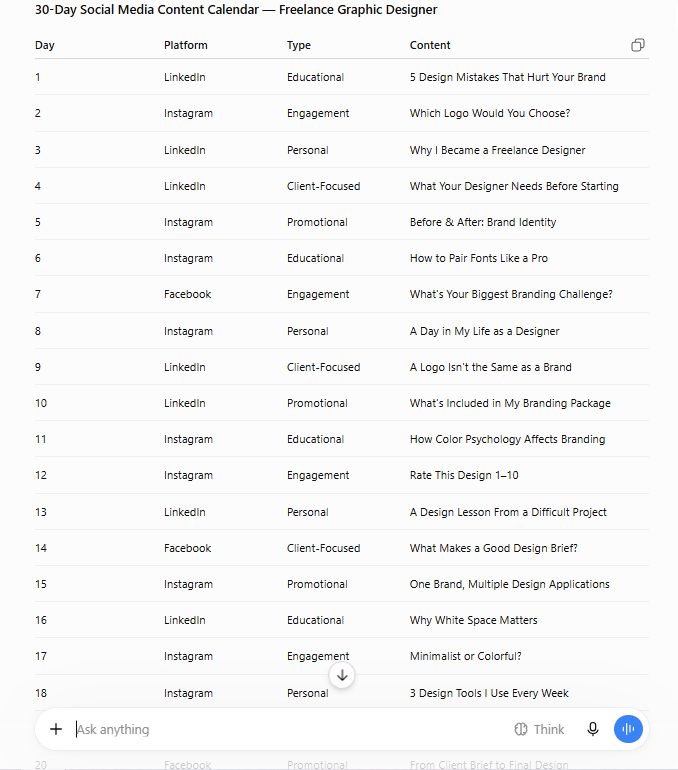
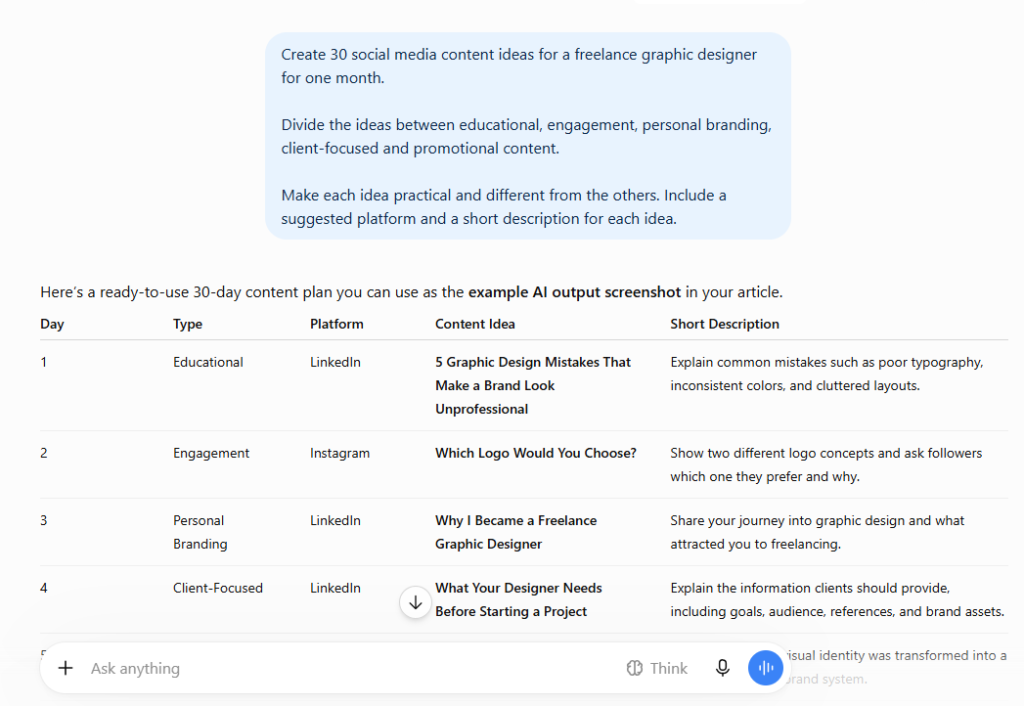
Create a simple spreadsheet or table with your post slots across the month and assign each slot to a content pillar. This map becomes your brief for the AI-assisted writing that follows — you are not going into the AI writing phase with a blank slate but with a structured content plan that needs executing.
A thirty-post month across five pillars means six posts per pillar — enough to build genuine topic depth without the repetition that over-concentrating on a single topic creates. The variety that pillar mapping produces is also better for algorithm performance across most platforms where content diversity signals active engaged accounts more effectively than single-topic concentration.
The Late Morning Block — AI-Assisted Writing Production (3 Hours)
This is the production phase — the block where AI and human judgment work together to produce the month’s content efficiently without sacrificing the authentic voice that makes social media content genuinely resonant.
The prompt architecture that works
The prompt quality you give AI directly determines the output quality you receive. Generic prompts produce generic content. Specific, context-rich prompts produce content that sounds like it came from someone with genuine expertise and genuine personality.
Here is the prompt structure I use for LinkedIn posts:
You are helping me create a LinkedIn post for my audience of [describe your audience specifically — e.g., early-stage freelancers who are trying to escape the 9-5 and build sustainable independent income]. The topic is [specific topic from your pillar map]. The angle is [specific perspective or hook]. Write in a conversational first-person voice that is direct and practical rather than inspirational or fluffy. Include a specific insight or counterintuitive perspective, a concrete actionable takeaway, and end with a question that invites genuine comment engagement. Length should be 150 to 200 words. Do not use buzzwords, clichés, or motivational language.
The specificity about audience, voice, length, and what to avoid is what elevates AI output from generic to genuinely usable. The AI is doing the production work; your specific guidance is doing the quality control.
The edit and authenticity pass
For every post the AI produces, spend two to three minutes reading it and making the specific edits that add your voice. This is not rewriting — it is voice injection. The specific phrase that sounds like you rather than a generic version of you. The example from your actual experience rather than the hypothetical the AI constructed. The opinion that is stronger or more specific than the measured perspective the AI defaulted to.
This two-to-three minute edit pass per post is what separates AI-assisted content from AI-generated content — and the audience can feel the difference even without being able to articulate why one feels more authentic than the other.
Platform adaptation
Once a core post is written and edited for your primary platform, adapting it for secondary platforms takes a fraction of the initial creation time. A LinkedIn post adapted for Twitter loses the professional framing and gains punchy directness. The same insight reformatted for Instagram becomes a carousel framework or a caption alongside a graphic concept. Give the AI the LinkedIn version and ask it to adapt for each secondary platform — the adaptation is faster than original creation while maintaining the insight quality of the original.
The Afternoon Block — Visuals and Scheduling (2 Hours)
By this point in the day you have a complete month of written content. The afternoon block converts this into scheduled posts that require zero further attention.
Visual content creation
Not every post needs a custom graphic, but the posts that do benefit significantly from visual consistency — a recognizable template style that builds visual brand recognition across your feed. Canva’s template system makes this efficient at scale: create one base template per format type (quote card, carousel slide, tip graphic, announcement), then batch-duplicate and fill across the posts that need visuals.
For thirty posts, perhaps twelve to fifteen need custom graphics. At an average of five to seven minutes per graphic using pre-built templates, this is sixty to ninety minutes of visual production — fast enough to complete in the afternoon block without rushing.
Batch scheduling
Open your scheduling tool and load the month’s posts in sequence. Copy post copy from your staging document, attach visual assets, select the posting date and time for each slot, and click schedule. The scheduling session for thirty posts with pre-written copy and pre-made visuals takes forty-five to sixty minutes — the mechanical final step that the morning and midday production has made fast.
Most scheduling tools allow bulk upload through a CSV file that imports all post copy and scheduling information simultaneously — an even faster approach for platforms that support this format and a worthwhile ten-minute investment in template creation that saves hours across repeated monthly content days.
The Final Hour — Engagement Preparation
The most underrated part of any social media content strategy is the engagement that happens after posting — the replies, comments, and conversations that the algorithm rewards with expanded reach and that the audience interprets as signals of genuine community presence. Batch-creating engagement responses might sound strange, but having a list of thoughtful response templates for the most common comment types means your published posts get the engagement attention they deserve without requiring daily active management.
Spend the final hour creating fifteen to twenty comment response frameworks — not scripted replies that feel robotic, but flexible templates for the comment categories your posts typically receive. The agreement comment. The question about implementation. The personal story share. The disagreement or pushback. The simple emoji reaction. Having considered response approaches for each category means your engagement is thoughtful rather than reactive and consistent rather than dependent on whatever mood you are in when notifications arrive.
How to Create a Month of Social Media Content With AI Every Single Month
The first time you do this workflow it will take longer than eight hours — the learning curve, the prompt refinement, and the initial template creation all take time that subsequent months do not require because they are already done. By month two the same workflow takes six hours. By month three you are regularly finishing in four to five hours and the content quality is higher because your prompts are refined by experience and your AI understands your voice better through the accumulated specific guidance you have developed.
The compounding benefit of doing this consistently is the content library that accumulates — the top-performing posts that you can intelligently repurpose in future months with updated examples, the prompt templates that consistently produce excellent output, and the visual template library that makes visual creation increasingly fast.
Once your content is created scheduled and publishing consistently the next question becomes how to amplify its reach beyond your existing follower base — and social media content that is repurposed strategically across platforms multiplies the impact of the single day’s creation work significantly. Pinterest in particular is the platform that most freelancers dramatically underutilize for content amplification — check out our complete guide on how Pinterest can drive traffic to your website for the strategy that turns your content into a consistent traffic source that works long after the original post date.
Frequently Asked Questions
Q: Does AI-generated social media content actually perform as well as hand-written posts?
A: AI-assisted content — where you provide specific direction, edit for voice, and inject personal experience — performs equally to hand-written content in most cases and better than reactive daily-created hand-written content in many cases because the structured planning and pillar-based approach produces more strategically coherent content than daily reactive posting regardless of the writing method.
The keyword is assisted rather than generated — AI that writes entirely without human voice injection consistently underperforms authentic human-authored content, and the two to three minute edit pass in this workflow addresses exactly this distinction.
Q: What if my industry or niche requires real-time current content?
A: The solution is a split approach — use this workflow for the sixty to seventy percent of your content that covers evergreen topics within your pillars, and reserve ten to fifteen post slots in your monthly calendar as unscheduled reactive slots for current events and trending topics that arise during the month. This hybrid approach gets you the efficiency of batching for the majority of your content while maintaining the responsiveness that current-event commentary provides.
Q: How do I maintain authenticity when using AI for content creation?
A: The authenticity comes from the specific direction you give the AI, the personal examples you add in the edit pass, and the opinions you sharpen beyond what the AI’s default balanced perspective produces. An AI prompt that says write a post about productivity will produce generic productivity content.
A prompt that says write a post about why the productivity advice to wake up at 5am is actively counterproductive for creative freelancers from the perspective of someone who has tried it and found the opposite to be true — this produces specific opinionated content that feels authentic because the specific perspective is entirely yours, even if the production work was AI-assisted.
Q: Can this workflow work for completely new social media accounts with no audience?
A: Yes — and the consistency that batching produces is arguably more important for new accounts than established ones. New accounts that post consistently for three to six months without the daily motivation failure that reactive daily content creation produces build audiences significantly faster than inconsistent accounts with occasionally excellent individual posts.
The batch approach provides the consistency that audience-building requires from accounts that are still in the early stage where motivation and inspiration are less reliable drivers of posting behavior than a systematic approach. The ability of how to create a month of social media content with AI in one day is what makes this consistency genuinely achievable rather than aspirationally planned and practically abandoned.
Conclusion
The month-in-a-day social media content workflow is not a hack or a shortcut — it is a fundamentally better architecture for content creation that matches how creative work actually flows at its best. Deep focused sessions with a loaded creative context produce better work faster than shallow daily sessions that require constant context-switching and creative re-entry.
AI tools make this architecture dramatically more accessible by reducing the production time within the focused session rather than replacing the strategic thinking and authentic voice that make the content worth posting.
Run this workflow once. The investment in learning and refining it in that first session pays back in every monthly content creation day that follows — each one faster than the last and producing content that consistently reflects your strategic priorities rather than whatever inspiration happened to arrive on any given Tuesday morning.
Your audience is waiting for the content you have not had time to create yet. Now you have the time.
Explore the complete collection of AI-powered freelancing tools and strategies at NextGen Freelancer — NextGen Freelancer Blogs Page — including the complete content creation system that makes this workflow immediately actionable from day one.