

You send a proposal on Monday. You check your inbox on Tuesday. By Friday you’ve quietly accepted that silence is the answer, and you open a blank document to write the next proposal pretty much the same way you wrote the last one. If your freelance proposals aren’t converting, that loop is the reason nothing changes: you never actually find out why.
The good news is that this is a diagnosable problem. A proposal is a sales document, and sales documents fail for specific, identifiable reasons. According to Harvard Business Review’s coverage of sales and persuasion research, buyers tend to respond more strongly to proposals that show a real understanding of their specific problem than to proposals that lead with the seller’s credentials and past work, which goes a long way toward explaining why generic template-style pitches so often go unanswered.
Here’s how to use AI to diagnose why your freelance proposals aren’t converting. Not by asking it to “make my proposal better,” which just gets you a prettier version of the same problem, but by feeding it your real proposals and your real results and asking it to find the pattern you can’t see because you’re too close to your own writing. The five steps below take one focused afternoon, and they will tell you more about your sales process than another month of guessing.
Why Your Freelance Proposals Aren’t Converting — and Why Guessing Doesn’t Fix It
When proposals stop landing, most freelancers reach for one of three fixes: drop the price, add more detail, or send more proposals. All three are guesses, and guesses feel productive right up until you notice that nothing has changed.
Pricing is the most common suspect, but it is rarely the real culprit. Clients who go silent after seeing a quote usually made their decision earlier. They decided you didn’t understand their problem, or that your offer was vague, or that you weren’t quite the right fit. Price just happened to be the last thing they saw before closing the tab.
Adding more detail has its own trap. A longer proposal isn’t a more persuasive one. Most clients skim, and a wall of text about your process buries the one thing they were hunting for, which is evidence that you’ve understood what they need.
And sending more proposals simply multiplies a broken process. Ten proposals with the same flaw give you ten rejections instead of five.
What’s missing in all three cases is information about your own process. That’s where AI earns its place. It can read twenty proposals in a couple of minutes, compare them without ego, and point out repeated patterns, like the fact that you open every single pitch with your own credentials, or that you never mention a timeline. You’d never notice those habits yourself because they feel normal when you’re the one writing.
The Five Usual Suspects Behind Low Proposal Conversion
Before you start the diagnosis, it helps to know what you’re hunting for. In my experience, nearly every conversion problem traces back to one of these five causes.
1. Wrong-fit leads. You’re sending proposals to people who were never going to hire you: budgets far below your rates, projects outside your specialty, or clients who are just collecting quotes. No amount of proposal polish fixes this.
2. An opening that’s about you, not them. “I’m a passionate freelancer with eight years of experience” is the most common first line in the world, and it’s the fastest way to look like everyone else in the inbox.
3. An unclear offer. The client finishes reading and still can’t say what exactly they’d receive, by when, and what happens next. Confusion kills deals quietly.
4. Price without context. A number dropped in without any link to the value of the outcome invites comparison with the cheapest option on the list.
5. No clear next step and no follow-up. The proposal just ends. No suggested call, no deadline, no gentle nudge a few days later. Plenty of “no response” proposals are really “never got a reason to respond.”
Hold onto this list. You’re going to use AI to figure out which of the five is hurting you most.
Step 1 — Build Your Proposal Log
AI can only diagnose what you show it, so the first step is collecting your evidence. Open a simple spreadsheet and record your last 15 to 30 proposals. Fewer than ten won’t reveal reliable patterns, and more than thirty is rarely necessary.
For each proposal, note:
- The date and where the lead came from (job platform, referral, cold outreach, social media)
- The type of project and the budget the client stated, if any
- Your quoted price
- How quickly you responded after the lead appeared
- The approximate length of your proposal
- The outcome: won, lost, or no response
- Any reason the client gave, even a throwaway comment
Then save the full text of each proposal in a separate document, labeled with the same outcome.
One important privacy step: before pasting anything into an AI tool, remove client names, company names, email addresses, and any confidential project details. Replace them with placeholders like [Client] or [Company]. You lose nothing in the analysis and you protect the people who trusted you with their information.
This log is the raw material for everything that follows. It’s also useful long after this exercise, because it turns your sales process from a feeling into a record.
Step 2 — Run an AI Audit on Each Lost Proposal
Now you start reading your proposals the way a skeptical client would. Take five of your lost or ignored proposals and run each one through an audit prompt.
Here’s the prompt I’d use:
You are an experienced freelance consultant who reviews proposals the way a skeptical, busy client would. Here is the job post or brief the client wrote: [paste]. Here is the proposal I sent: [paste]. The client did not respond. Please evaluate my proposal on five criteria: how well the opening shows I understood the client’s specific problem, how clear my offer and deliverables are, how well I justify my price relative to the value delivered, how easy I make the next step, and how much of the proposal is about me versus about them. Score each out of 10, quote the exact lines that lose points, and rewrite the weakest section.
Note: Below is the screenshot of the output received from the prompt given to Claude AI. The job post and proposal are fictional samples. Your output will reflect your own real proposals.
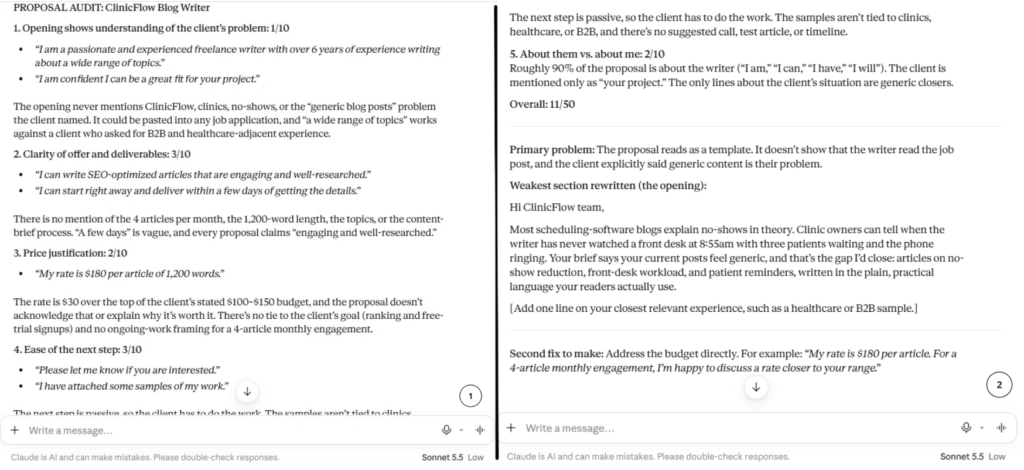
The instruction to quote exact lines matters. Without it, AI tends to hand you vague feedback like “be more specific,” which you already knew. Asking for the exact sentences forces it to show its evidence, and you can judge for yourself whether the criticism is fair.
Run the prompt on all five proposals, then write down the scores in your log. Don’t read the rewrites yet. The scores are the valuable part, because patterns across scores tell you where you’re consistently weak. If four of five proposals score under 5 on “understood the client’s specific problem,” you’ve found something real.
Step 3 — Compare Your Wins and Losses Side by Side
An audit of your losses tells you what’s wrong. A comparison with your wins tells you what’s right, and the gap between the two is where the diagnosis lives.
Pull three proposals that won work and three that were ignored or rejected, ideally for similar types of projects. Then use this prompt:
Below are three proposals that won work, labeled WON, and three that were ignored or rejected, labeled LOST. All are for similar services. Compare them carefully. What do the winning proposals do that the losing ones don’t? Look at opening lines, length, structure, specificity, tone, how pricing is presented, and the call to action. List the three most consistent differences and give a short example from each set.
Note: Use this the same way as the Step 2 example. Paste in three of your winning proposals and three of your losing ones, and you’ll get a comparison laid out like the screenshot (shown above in step 2), based on your own work.
This is the step that surprises people most. You may discover that your winning proposals are shorter, or that they all ask the client a question in the first paragraph, or that they were sent within a few hours of the job being posted while the losers went out two days later. Those aren’t things you’d guess, and they’re exactly the kind of pattern AI is good at spotting when you hand it the right material.
A word of caution: three versus three is a small sample. Treat what you find as a hypothesis worth testing, not a law. Step 5 is where you test it.
Step 4 — Diagnose Why Your Freelance Proposals Aren’t Converting: Find the Pattern
You now have scores from your audits, a list of differences between wins and losses, and your proposal log. Time to put it all together and make the call.
Paste your anonymized log table into the AI along with a short summary of what you found in Steps 2 and 3, and use this prompt:
Here is a table of my last [number] freelance proposals with lead source, stated budget, my price, response time, proposal length, and outcome: [paste table]. Here is a summary of what an audit and a win/loss comparison found: [paste summary]. Which of these is the most likely primary cause of my low conversion: wrong-fit leads, a weak opening, an unclear offer, price presented without value, or missing follow-up? Rank all five by likelihood, explain your reasoning using evidence from my data, and tell me what additional information would change your ranking.
Note: Use this the same way as the Step 2 example. Paste in your proposal log and your findings from the earlier steps, and you’ll get a ranked diagnosis like the screenshot above, based on your own numbers.
That last instruction, asking what would change its ranking, keeps the AI honest about uncertainty instead of confidently handing you a tidy answer from thin data.
Then check the verdict against these common patterns:
Few replies at all, even to well-matched jobs: Usually an opening problem. Clients aren’t getting past the first few lines.
Lots of replies but few hires: Usually an offer or fit problem. You get attention, but the details don’t convince.
Good conversations that go quiet after you send a price: Usually price presented without context, or a missing next step.
Most lost proposals went to clients with stated budgets well below your rate: This is a lead problem, not a writing problem. If your diagnosis shows you are sending good proposals to the wrong people, the fix lives upstream of the proposal itself. For better-fit leads, read our guide on how to find clients without Upwork or Fiverr, which covers the outreach methods that bring you prospects who are already a good match before you write a single word of a proposal.
Notice what just happened. You went from “my proposals aren’t working” to a specific, testable statement like “my openings are about me and my leads are under-budget.” That’s a problem you can actually solve.
Step 5 — Change One Thing and Test It
Here’s where most people sabotage a good diagnosis: they find three problems and fix all three at once. Then when results improve, they have no idea which change helped. And when results don’t improve, they have no idea which change to blame.
Pick the single biggest issue from your diagnosis and change only that for your next ten proposals. If the problem is your opening, ask AI to help rewrite it:
Rewrite my proposal opening so the first two sentences describe the client’s problem in their own words, and the third states the outcome I will deliver. Keep it under 80 words. Do not mention my experience until later in the proposal. Here is the job post: [paste]. Here is my current opening: [paste].
Note: Below is the screenshot of the output received from the prompt given to Claude AI. The job post and current opening are fictional samples. Your output will reflect your own real proposals.
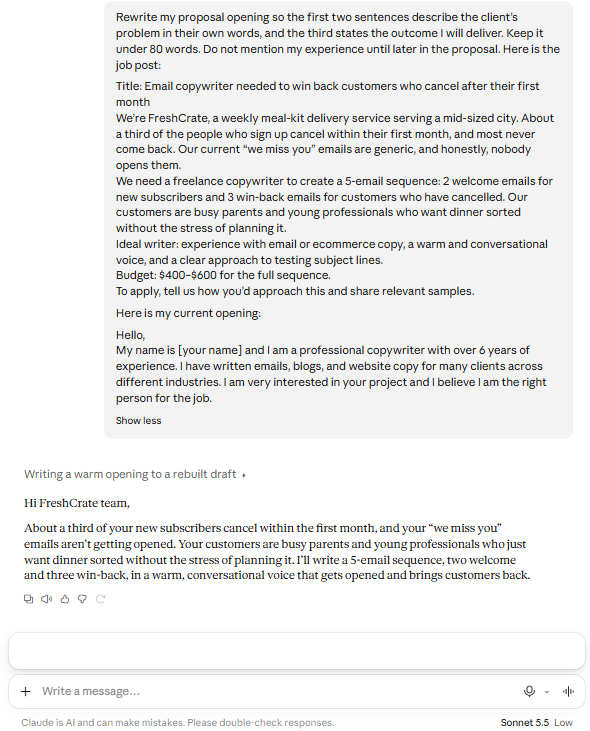
Then edit the result in your own voice. This part matters. AI drafts are a starting point, and clients can spot a generic, overly polished pitch from a mile away. Your specific phrasing, your real examples, and your actual personality are what make a proposal feel like it came from a person worth hiring.
If the diagnosis pointed to missing follow-up, build a simple rule: send a short, friendly follow-up three to five days after every proposal that gets no reply. AI can draft it, but keep it to two or three sentences that add something useful, like a relevant idea for their project, rather than the dreaded “just checking in.”
After ten proposals, record the results in your log and compare them with your baseline. Don’t expect a miracle from ten data points. Look for movement, then change the next variable. Over a few rounds, this small, patient process compounds in a way that random rewrites never do.
What AI Can’t Tell You (and How to Find Out Anyway)
I want to be honest about the limits here, because it would be easy to treat this process as magic. AI can only analyze what’s on the page. It can’t know that the client’s budget was frozen the day after they posted the job, that they hired their cousin, or that your timing was just off. Some proposals fail for reasons that have nothing to do with the writing.
There’s also a simple way to fill the gap AI can’t: ask. When a prospect goes quiet, send one short, gracious message a week or two later:
Thanks again for considering my proposal. If you have a moment, I’d really value one line on what made you go another way. I’m always looking to improve.
Not everyone replies. But the ones who do will often tell you something no analysis could, like “your price was fine, but we weren’t sure you understood our industry.” Feed those answers back into your log. A real client’s words beat any AI hypothesis.
Frequently Asked Questions
Q: How many proposals do I need before this process is useful?
A: Aim for at least 15, with 20 to 30 being better. With fewer than ten, a couple of lucky wins or unlucky losses can distort the picture. If you haven’t sent that many yet, start the log now and run the analysis once you have enough data. In the meantime, you can still use the audit prompt on individual proposals to catch obvious problems.
Q: Is it safe to paste client information into an AI tool?
A: Be careful. Remove client names, company names, contact details, and anything confidential before pasting, and replace them with placeholders. Also check the privacy settings of the AI tool you use, particularly whether your conversations may be used for training. When in doubt, share less. The analysis works just as well without identifying details.
Q: Should I let AI write my proposals for me?
A: I’d use it as an editor and sparring partner rather than a ghostwriter. AI is excellent at spotting weaknesses and suggesting structure. It’s much weaker at capturing your real voice and your genuine understanding of a client’s situation, which is exactly what makes a proposal persuasive. Clients increasingly recognize generic AI-written pitches, so use AI to sharpen your thinking and then write the final version yourself.
Q: What’s a good proposal conversion rate?
A: It varies enormously depending on your niche, your lead source, and how targeted your outreach is. Warm referrals convert far better than cold platform bids, for example. Rather than chasing someone else’s benchmark, compare yourself against your own past results and aim to improve steadily.
Q: What if my diagnosis says my pricing is the problem?
A: Be careful before reaching for a discount. Often the real issue is that the price arrived without enough context about the value of the result. Try reframing the price around the outcome before lowering it. If the numbers still don’t work, revisit your rates using a structured approach.
Conclusion
When freelance proposals aren’t converting, it’s tempting to take it personally or to start changing things at random. Neither helps. What helps is treating your proposals like any other business process: collect the evidence, find the pattern, change one thing, and measure the result.
AI makes that discipline far easier than it used to be. It reads your proposals without defensiveness, spots the habits you’ve stopped noticing, and turns a vague sense of “something’s off” into a specific, fixable problem. The five steps in this guide take an afternoon to run through the first time, and each round after that gets faster and sharper.
Your next proposal doesn’t have to be another guess. Start your log today, run your first audit, and let the data tell you where to begin.
Explore the complete collection of AI-powered freelancing resources at NextGen Freelancer — NextGen Freelancer Digital Products Page — including the tools and templates that make winning more clients a repeatable process rather than a lucky break.